Loading ...
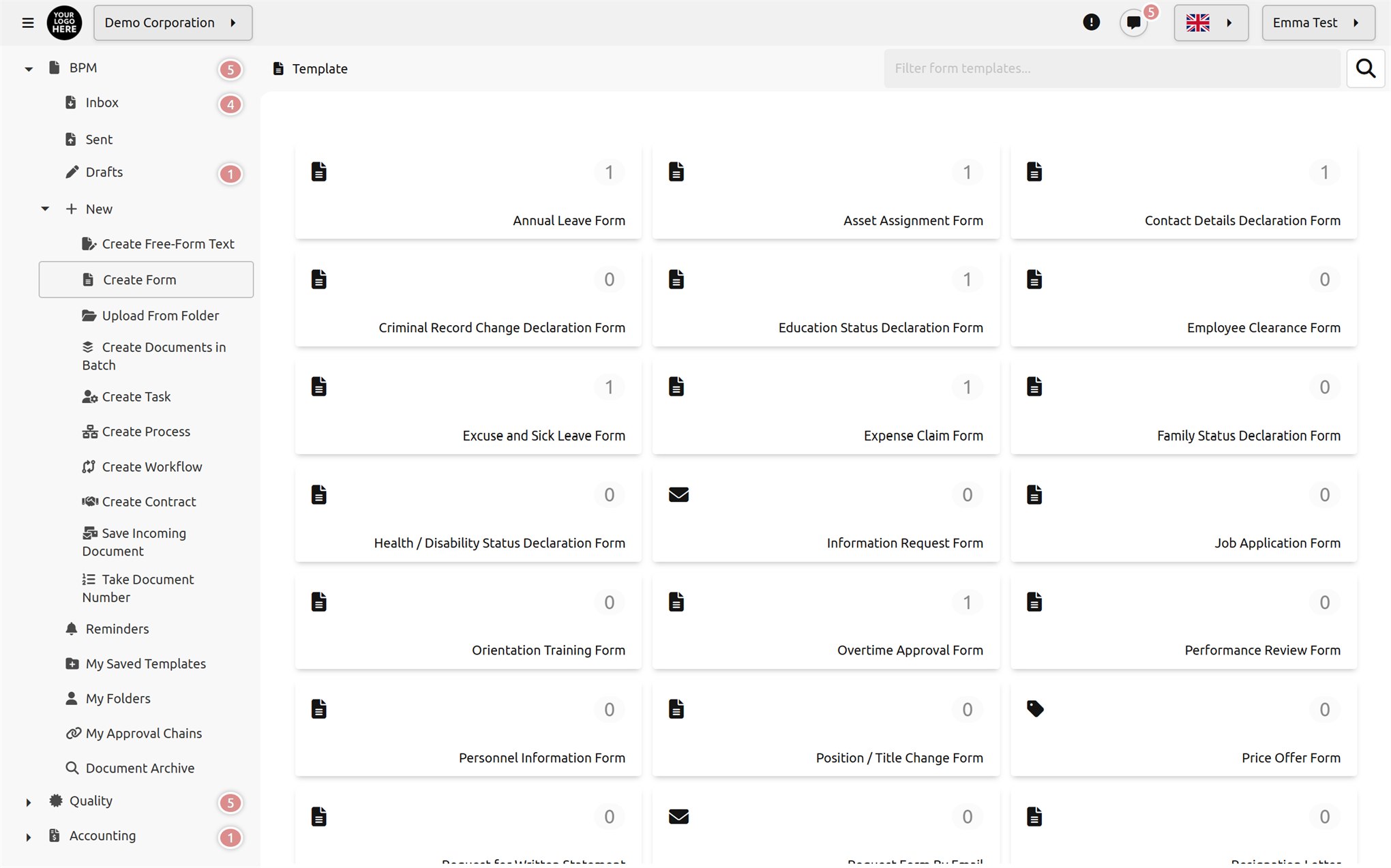
Form Management lets you design forms with the most flexible and user-friendly tools; with rich field types and customizable rules, you can create unlimited forms and manage your data effectively by integrating these forms into your business processes.
Define your fields using rich field types, create as many tables as you like on the same form, set rules, order and format them. Publish online or use within your company. Include the forms you collect in your workflows and processes. Analyze the data. The future of form management is here.
 Within the company
 Online
 With surveys
 FRM-002 · HR
 FRM-016 · HR
 FRM-017 · HR
 FRM-018 · HR
 FRM-015 · HR
 FRM-020 · HR
 FRM-019 · HR
 FRM-013 · HR
 FRM-012 · HR
 FRM-024 · HR
 FRM-025 · HR
 FRM-022 · HR
 FRM-023 · HR
 FRM-007 · Declaration
 FRM-008 · Declaration
 FRM-009 · Declaration
 FRM-010 · Declaration
 FRM-011 · Declaration
 FRM-006 · Operations
 FRM-004 · Operations
 FRM-014 · Operations
 FRM-003 · Operations
 FRM-078 · Operations
 FRM-005 · Request
 FRM-021 · Request
 FRM-072 · Request
 FRM-999 · System
Use the templates as they are, copy and adapt them, or start with a blank form. Templates can be moved to other installations by exporting and importing them.

Single- and multi-line text, rich text, integers and decimals, data ranges; with masks, length and value limits.
Date, time, date-time; checkbox, single or multiple selection from a list or a box, color.

User, unit and title selection; contact and company records from the directory; inventory item, warehouse and production center.

Dataset selection, table (repeating rows), file and image, location, auto-numbering, HTML template text and AI command.
Order the fields, adjust their widths and headings; write labels, descriptions and default values in ten languages. Calculated fields update automatically as the fields in their formula change; with scripts that run on value change, you can show or hide fields.


To the form's creator, their first- or second-level manager, the unit manager, a security group, a user, the person selected in a field on the form, or an external email address. Steps can be parallel groups and can join the chain only when a condition is met.

With a click, a password or one-time code, or an electronic signature (XAdES, CAdES, PAdES; including mobile signature). Bulk signing, delegation and forwarding are supported.
Publish a form template via a public link or embed it in your website. Submitted forms enter the same approval chain as if they had been filled in within the company.

Open the form to everyone or to registered, signed-in members; external users can also attach files.

Make sure the embedded form works only on the sites you allow.

Choose the theme and font; add links to your terms of use and privacy notice.
Survey SurveySurvey
 SurveySurvey
 Survey
 Survey
 Survey
 SurveySurveySurvey
Surveys use sections, single and multiple choice, yes/no, rating/scale and open-ended questions. Make the survey anonymous or target it at units, groups, users and email addresses; set start and end dates, and track view and completion counts.
Before the form is created, when it leaves or returns to draft, when a specific task or all tasks are completed, when it returns to a task, when cancellation starts or completes, and when it is deleted.
It adds, updates or deletes dataset rows; runs database queries; calls HTTP, SOAP or SAP services; writes files; sends email, SMS and notifications; manages user accounts and group memberships, and assigns delegations.
Each form template writes to its own reporting table; form data can be used directly in business intelligence dashboards. A dataset can also be generated from a form template with a single click.

Lets you create your own datasets, use the information in these datasets in your forms, and add form data to your datasets.

Lets you create forms quickly and easily by ordering fields and adjusting their widths, or by typing the field list line by line.

Supports more than 20 field types, including single-line text, multiple choice, date, time, geolocation, data range and list selection.

Lets you customize the form-filling process by defining field-specific rules and descriptions.

Allows some fields on the form to be filled in by different people at different stages of the signature and approval chain.

Lets you collect detailed data by defining multiple tables and datasets on a single form.

Lets you save the forms you design as PDF, or publish them directly online to collect data from the public.

Lets you achieve automated data flow by including the forms you collect in your workflows and processes.

Lets you define access and editing rights to forms, specifically for units or groups.

Lets you integrate your forms with your company's other systems by defining event triggers for steps in the signature and approval process.

Lets you prepare form fields and instructions in multiple languages, so you can reach a broad audience.

Using collected data in business processes. Automatically generating reports and analyses from form data.