Loading ...
 Sales
Sales
 Purchasing
 Inventory
 Production
 General Ledger
 Accounts
 Fixed Assets
 e-Documents
The Documenos® “Inventory Management Module” includes all the core features you would expect from stock and inventory management software.
Documenos® provides, as integrated functions, all the tools needed to manage the end-to-end lifecycle of a stock item in your company/organization.
Documents are converted into one another and stay linked; you never enter the same information twice.
 Sales chain
 Purchasing chain
Production chain
Purchasing chain
Production chain
Sales and purchase documents are issued as a delivery note, invoice, invoice with delivery note or consignment. The order status (awaiting production, ready to ship, invoiced, paid…) stays up to date at every step.
Sales
Sales
 Sales Document
Sales Document
Sales Document
 Sales Document
 Sales Document
Production
Sales Document
Production
 Purchasing
 Purchasing
 Purchase Document
Purchase Document
Purchase Document
Purchase Document
Purchase Document
 Purchase Document
 Stock Voucher
 Stock Voucher
 Stock Voucher
 Stock Voucher
 Stock Voucher
 Accounting Voucher
Accounting Voucher
Accounting Voucher
 Accounting Voucher
 Accounting Voucher
 Accounting Voucher
 Accounting Voucher
 Accounting Voucher
 Accounting Voucher
 Accounting Voucher
The type of a sales or purchase document (delivery note, invoice, invoice with delivery note, consignment) is selected on the document itself. Permissions determine which user can create which document.
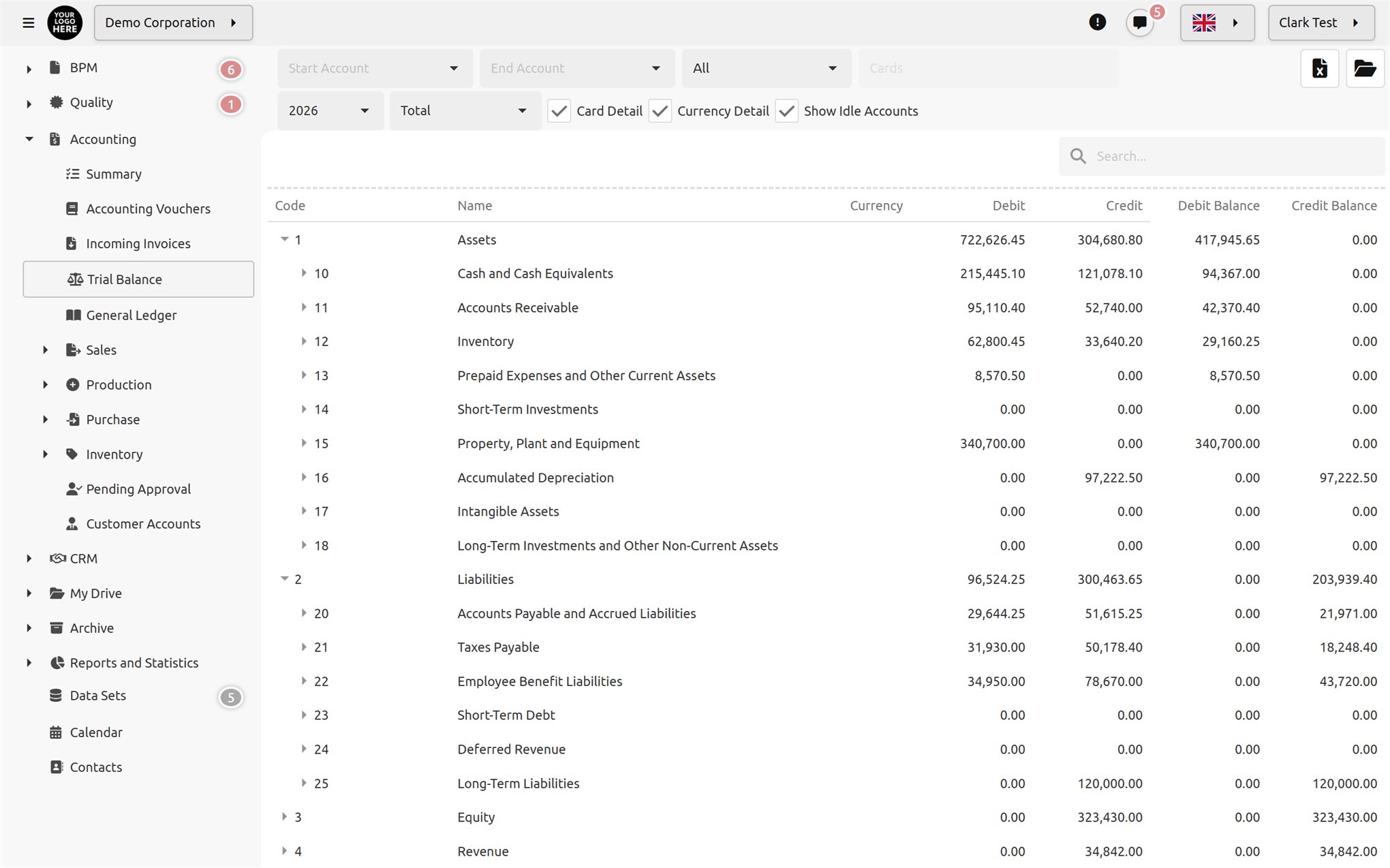
Start with a ready-made chart of accounts available in ten languages; each account card is linked to its own ledger code.
Debit/credit, currency and exchange rate on voucher lines; amounts are also converted into the company's base currency.
Drill down from the subsidiary ledger to the voucher with one click; view reports by currency and export them to Excel.
Supported accounting voucher types:
Your invoices are sent in UBL-TR format via the integrator you select for your company (İzibiz or NES). Submissions are tracked in a queue and retried if an error occurs.
e-Invoice (basic and commercial) and e-Archive. The e-document queue shows the status of every submission: queued, sent, approved by GİB, accepted, rejected. You can check whether the recipient is registered for e-Invoice.
Incoming invoices are retrieved regularly. When accepting, you match each line to a stock, income, expense or fixed asset card and the purchase document is created automatically; when rejecting, you are asked to enter a reason.
For inventory tracking, it lets you manage the following core concepts with complete flexibility: Stock classes, Stock units, Production centers, Production recipes/formulas, Warehouses, Stock cards, Stock rules, Stock document header fields, Sales price lists, Custom print templates for stock documents.
Documenos® supports building rule-based workflows to meet the needs of companies/organizations that want to model inventory management flexibly.
The Documenos® "Inventory Management Module" provides ready-made toolsets for a company/organization to manage the following inventory workflows and the approval chain processes integrated into them: Sales quotation letters, Sales orders, Sales documents (invoice, delivery note, etc.), Production recipes and formulas, Production records, Purchase requests, Purchase orders, Purchase documents (invoice, delivery note, etc.), Stock opening vouchers, Stock count vouchers, Stock shipment vouchers, Stock consumption vouchers, Stock loss vouchers.

Stock classes are defined as a tree structure. Their names can be defined in different languages, and multiple unit managers, groups or users can be selected to approve purchases or sales that exceed quotas. When a group is specified, approval by any one group member is considered sufficient.

Stock units and unit conversions are defined together. Documenos® includes Unit, Area, Weight, Volume and Length units along with predefined conversion tables for them. Custom units required by the company/organization and their conversion equivalents can be added as needed.
The following information can be recorded on stock cards: Code, Name, Stock Type, Trade Goods, Fixed-Recipe Production, Variable Recipe, Production, Raw Material, Consumable, Fixed Asset, Group Stock, Brand and Model Name, Stock Quantities, Default Unit, Barcode, Tax, Stock Class, Reserved Sales, Serial Tracking, Shelf Life Tracking, Warranty Period Tracking, Minimum Quantity Tracking

When any stock transaction is saved, all rules in the stock rule list are evaluated. If a record matches more than one rule, the approval chain is applied as the combination of those rules. Rules check conditions such as quantity, amount, unit price or selling below the price list; if the record is changed, the approval chain starts over.
An unlimited number of sales price lists can be created, including price lists with future effective dates. When sales records (sales invoices, etc.) are created, unit prices from the price list valid on the record date are applied automatically. Sales staff entering the record can adjust unit prices manually.
Documenos® offers two production models: -Fixed-recipe production (the same recipe is used for all customers; recipes may change over time, but each production run uses the recipe table valid at the time of production) -Variable-recipe production (customer-specific or order-specific production recipes are tracked)
From the Documenos® “Recipes/Formulas” screen, fixed-recipe and variable-recipe stock cards can be managed together. The details of any production recipe are managed along with all the changes made to it over time.

When creating a record in the Inventory Management Module, whatever its type, the record's metadata (metadata fields) can be extended dynamically according to your company's/organization's needs.

You can prepare multiple print templates for a record type. When you want to print a record or generate a PDF, the system first asks which template you want to use and then generates the PDF using the template you selected.
Documenos® offers advanced Sales Quotation Letter Management.
Documenos® offers advanced Order Management.

Delivery Note, Invoice, Invoice with Delivery Note and Delivery Note Management.
If the details of a purchase request are changed after it has been approved, the record is checked again; if a condition requiring approval is detected, the record is automatically sent back to the approval chain.
You can enter as many stock items as you like in the detail lines of a purchase order.
Delivery Note, Invoice, Invoice with Delivery Note or Consignment.
In the Documenos® inventory management module, all of your company's/organization's product warehouses can be tracked simultaneously and in real time. When the inventory screen opens, incoming, outgoing and remaining quantities across all warehouses and stock classes are always reported without any filtering.
Opening, Consumption, Waste, Shipment, Stock Count.

In the Documenos® inventory management module, transaction records for all of your company's/organization's product items can be tracked simultaneously and in real time as “stock movements”.
Documents awaiting approval from users are saved to the “Pending Approvals” list. To complete the approval process, the user simply opens the document and clicks either the "Approve" or "Reject" button.
Incoming, outgoing and remaining quantities by warehouse, stock class and date; running balance in movement lists.

Monitor stock reserved for sales representatives and transfer a reservation to another record when needed.

Products tracked for warranty period and shelf life appear in separate reports; query by serial number.

Stock cards that fall below the minimum level appear in a single list.
Share a quotation, order or invoice as a PDF using the template of your choice with users, groups, email addresses or via a public link, with time and usage limits.

Every document carries a QR code and a verification code; the document is verified on a public verification page. Cancelled documents are printed with a "CANCELLED" watermark.

Each screen opens with its own permission; cards are restricted by unit, group or user, and warehouse and production center permissions are granted separately.
Customer/supplier accounts are the same as the customer records in CRM; card screens can be imported from and exported to Excel. Everything is kept per company, so nothing gets mixed up in a multi-company setup.